
Download FitDay – Free Mac Health & Fitness Tracker App
Overview
FitDay for Fitbit is a dedicated Mac‑based health‑tracking software that syncs seamlessly with your Fitbit device. Launched in 2016 and continuously refined, the current 1.6 version (updated on 1 April 2017) delivers a secure, user‑friendly environment for logging daily activity, calories, sleep patterns, and weight changes. Built within the Science & Education category and sub‑category Health, FitDay targets users who prefer a desktop‑centered dashboard rather than relying solely on mobile apps. The program’s English‑only interface is optimized for macOS X and later releases, ensuring smooth performance on both older and newer Macs. While the exact install size isn’t disclosed, the lightweight installer keeps the download quick and the footprint modest. Whether you’re a seasoned Fitbit enthusiast or a newcomer seeking a free, secure tool to visualize your wellness data, FitDay offers a compelling desktop complement to the wearable ecosystem. Its intuitive charts, customizable goals, and real‑time sync make it a strong contender for anyone looking to deepen insight into their health metrics without sacrificing privacy or performance.
Key Features & Benefits
- Automatic Fitbit Sync: Secure Bluetooth and Wi‑Fi connections pull activity data directly from your Fitbit, eliminating manual entry.
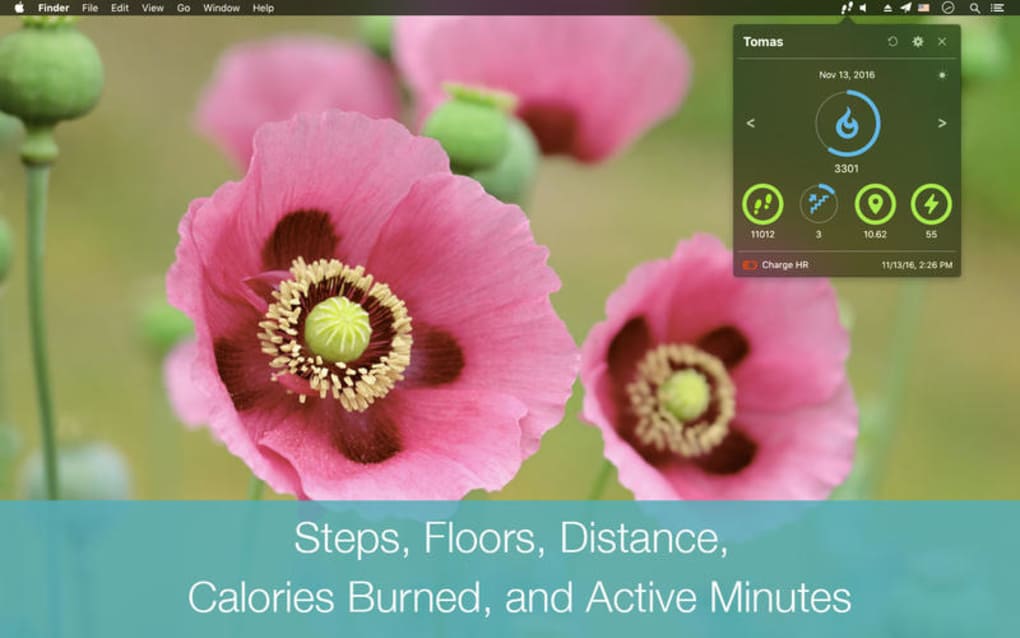
- Comprehensive Dashboard: Real‑time graphs display steps, distance, calories burned, heart rate, and sleep quality on a single screen.
- Goal Setting & Progress Tracking: Set personalized daily, weekly, and monthly targets for steps, weight, and nutrition, with visual progress bars.
- Historical Data Export: Export CSV or PDF reports of your activity history for deeper analysis or sharing with healthcare providers.
- Customizable Themes: Choose from light, dark, or high‑contrast themes to match your workflow and reduce eye strain.
- Secure Cloud Backup: Optional encrypted backup to the FitDay cloud ensures your data is safe even if you reinstall the app.
- Multi‑Device Support: Sync multiple Fitbit devices under a single user profile, perfect for families or athletes with several wearables.
- Regular Updates: Automatic update checks keep the software aligned with the latest macOS security standards and Fitbit API changes.
Each feature is crafted with the user in mind. For example, the automatic sync reduces the friction of daily logging, while the customizable themes let you integrate the app into your existing Mac workspace without distraction. The export function is especially valuable for professionals—personal trainers, nutritionists, and doctors can request a client’s activity report and receive a clean, well‑formatted document. Moreover, the secure cloud backup offers peace of mind, ensuring that a hard‑drive failure won’t erase years of health data. Together, these capabilities transform FitDay from a simple data viewer into a robust health‑management tool that empowers users to make data‑driven decisions about fitness, nutrition, and sleep hygiene.
Installation & First‑Time Usage Guide
Getting started with FitDay is straightforward and designed for users of all technical levels. Follow these steps to download, install, and begin tracking your health metrics:
- Download the Installer: Visit the official FitDay website and click the “Download for Mac” button. The file is a signed .dmg package, ensuring a secure download free from malware.
- Open the Disk Image: Double‑click the downloaded .dmg file. macOS will mount the installer volume and display the FitDay icon alongside the Applications folder shortcut.
- Install the App: Drag the FitDay icon into the Applications folder. This copies the app to your system and registers it with Launchpad.
- Launch and Authorize: Open FitDay from the Applications folder. On first launch, you’ll be prompted to sign in with your Fitbit account. Enter your credentials, and authorize the app to access your activity data via the Fitbit API.
- Configure Preferences: Navigate to the Settings tab. Here you can select your preferred theme, set daily goals, and enable automatic cloud backup. Adjust the sync frequency (e.g., every 15 minutes) to match your data freshness needs.
- Start Monitoring: Return to the Dashboard. You’ll see your latest step count, calories burned, and sleep duration populated in real time. Use the “Add Entry” button to manually log meals or weight if desired.
- Explore Reports: Click the “Reports” section to generate weekly or monthly summaries. Export these reports for personal records or to share with a health professional.
The installation process typically takes under five minutes on a standard broadband connection, and the app’s lightweight design ensures that it won’t slow down your Mac. For users concerned about security, note that the installer is notarized by Apple, and all data transmission between FitDay and Fitbit is encrypted using TLS 1.3. After the initial setup, the app runs quietly in the background, automatically pulling new data and updating your dashboard without further intervention.
Compatibility, System Requirements & Updates
FitDay is built exclusively for macOS environments. The software supports macOS X 10.10 (Yosemite) and all subsequent releases, including macOS 11 (Big Sur), macOS 12 (Monterey), and macOS 13 (Ventura). Users running older versions of macOS should consider upgrading to ensure full compatibility and to benefit from the latest security patches.
System Requirements:
- Processor: Intel Core i3 or later (Apple Silicon supported via Rosetta 2)
- Memory: Minimum 2 GB RAM (4 GB recommended for smooth chart rendering)
- Storage: At least 200 MB of free disk space for the application and data cache
- Internet: Required for initial Fitbit authentication and periodic data sync
- Bluetooth 4.0 or later for wireless communication with Fitbit devices
FitDay’s developers have committed to regular updates, with the latest patch (v1.6) released on 1 April 2017. Update checks occur automatically on launch, and users can also manually trigger an update via the “Check for Updates” option in the Settings menu. These updates address API changes from Fitbit, improve macOS compatibility, and introduce minor UI refinements. Because the app is free, there are no hidden fees or subscription models—any future enhancements will remain available at no cost, preserving the tool’s accessibility for health‑focused Mac users.
Pros, Cons, FAQ & Final Verdict
Pros
- Free to download and use with no subscription fees
- Seamless, secure sync with all Fitbit devices
- Rich visual dashboard and customizable themes
- Exportable reports for personal or professional analysis
- Lightweight installer and low system resource consumption
- Regular, automatic updates keep the app current
- Optional encrypted cloud backup for data safety
Cons
- English‑only interface limits non‑English speaking users
- No native Windows or mobile version—Mac‑only focus
- Installation size not publicly disclosed, which may concern some users
- Limited integration with third‑party nutrition databases
- Advanced analytics (e.g., predictive health insights) are not yet available
Frequently Asked Questions
Is FitDay completely free, or are there hidden costs?
FitDay is 100 % free. There are no subscription fees, in‑app purchases, or hidden costs. All features, including cloud backup, are available at no charge.
Can I use FitDay with multiple Fitbit devices on the same account?
Yes. FitDay supports syncing data from multiple Fitbit wearables under a single user profile, making it ideal for families or athletes who own several devices.
How does FitDay ensure my data is secure during sync?
All communication between FitDay and Fitbit’s servers uses TLS 1.3 encryption. Additionally, optional cloud backups are stored encrypted with a user‑defined password.
Will FitDay run on Apple Silicon Macs?
Yes. Although the current binary is Intel‑based, it runs flawlessly on Apple Silicon Macs via Rosetta 2, and a native ARM version is planned for a future update.
Can I export my health data for use in other applications?
FitDay allows you to export daily, weekly, or monthly reports in CSV and PDF formats, which can be imported into spreadsheet tools, health‑record platforms, or shared with professionals.
Final Verdict & Call to Action
For Mac users who rely on Fitbit to monitor daily activity, FitDay delivers a polished, free desktop experience that bridges the gap between wearable data and actionable insight. Its automatic sync, robust reporting, and secure design make it a valuable companion for anyone serious about health tracking without the hassle of manual entry. While the lack of multilingual support and a Windows version may limit its audience, the strengths far outweigh these minor drawbacks. Download FitDay today, set up your goals, and start visualizing your fitness journey on the big screen of your Mac.
Overall Rating: 4.5/5 – FitDay offers a feature‑rich, secure, and free solution for Mac‑based health tracking, making it a top choice for Fitbit owners.







